Radarbot: Radar Detector, GPS
Radarbot CompanyMaps & Navigation
4.14.74K Reviews
- Version
- Varies With Device
- Installs
- 50.00M
- Age Rating
- Everyone
Screenshots
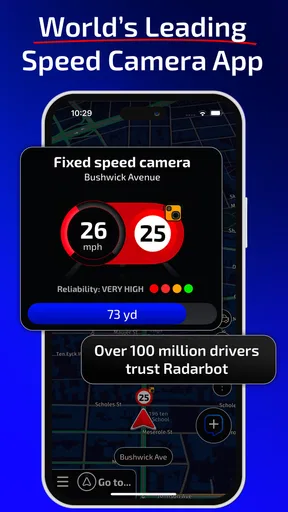
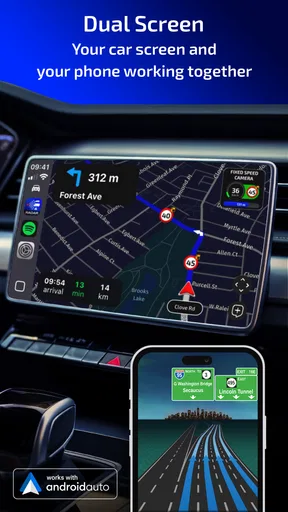
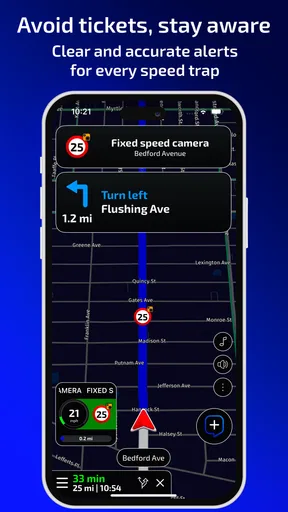
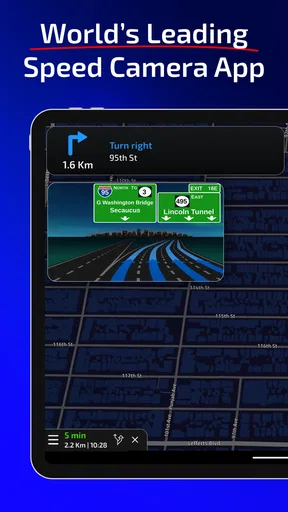
Our Review of Radarbot: Radar Detector, GPS
 Analysis by Appyee
When I’m choosing a driving app, I want to know whether it adds useful awareness without becoming another distraction. That balance matters more to me than a long feature list: a warning is only helpful if I can understand it quickly, keep my attention on the road, and still use my usual navigation when that is the better fit. Radarbot is built around speed-camera alerts and navigation, so it makes most sense for drivers who want a dedicated extra layer of awareness rather than a complicated all-in-one travel planner.
I’d treat any alert as a prompt to check my speed and surroundings, not as a guarantee that a camera or hazard will be reported. Road conditions and rules vary, and drivers remain responsible for following local laws. With that in mind, the useful question is not whether an app can promise to prevent fines, but whether its warnings fit naturally into your normal drive.
Choosing the right kind of driving aid
For a regular commute, the main decision is whether you need camera warnings often enough to justify opening a separate app. A driver who mostly travels familiar streets may get more value from the navigation they already use. Someone who regularly moves between unfamiliar roads, commutes through changing routes, or takes long drives may appreciate having a speed-focused companion available when it is useful.
It also helps to decide what role you want the app to play before setting off. If you need turn-by-turn guidance as the main task, a conventional navigation app may be the clearer choice. If your route is already planned and your priority is hearing relevant road alerts, a dedicated speed-camera app can be a more focused addition. I would not try to adjust settings while moving; choose alert preferences while parked and keep the screen secondary to the road.
A practical fit for routine and unfamiliar routes
Imagine a weekday drive that usually follows a familiar route but is diverted onto roads you rarely use. A navigation app can help with the new directions, while Radarbot’s alerts may add context about reported cameras or hazards along the way. The benefit is not that it takes over the journey; it is that it can make a driver more attentive to speed and reported conditions without requiring constant map-checking.
That distinction is useful on longer trips, too. I would set the route and sound preferences before leaving, then rely on spoken prompts where available rather than repeatedly glancing down. If a warning comes at a busy junction or in heavy traffic, the safest response is still to concentrate on the actual road situation. An app can help focus attention, but it cannot judge whether a manoeuvre is safe or replace careful driving.
Radarbot is a Maps & Navigation app from Radarbot Company. It is free to install, rated for Everyone, and has a 4.1 average from around 619,000 ratings, with over 50 million installs. It first appeared on March 8, 2016, and offers in-app purchases ranging from $1.99 to $79.99 per item. Those purchase options make it sensible to begin with the free experience and decide from actual use whether a paid tier is worthwhile, rather than assuming an upgrade is necessary.
First Impressions and Setup
Alright, so first things first—downloading and setting up Radarbot: Radar Detector, GPS was a breeze. The app is available on both Android and iOS, so no worries about compatibility. Once you install it, you’re greeted with a clean and user-friendly interface that doesn’t overwhelm you with options. Simplicity is key here, folks.
The setup process is straightforward. You just need to allow the app access to your GPS location, and you’re good to go. The app uses this info to alert you about nearby speed cameras, traffic alerts, and more. No rocket science here, just a couple of taps and you’re all set!
Location access is central to a driving alert tool: without a reliable location signal, warnings may be less useful. I’d check that the phone can determine its position before relying on the app for a new route, especially if I’m starting in a garage or another place where reception may be poor. This is an easy pre-drive habit, and it avoids troubleshooting with the car already moving.
Features Galore
Now, on to the fun stuff—what exactly can Radarbot do for you? Well, it’s packed with features that any road warrior would appreciate. Here’s a quick rundown:
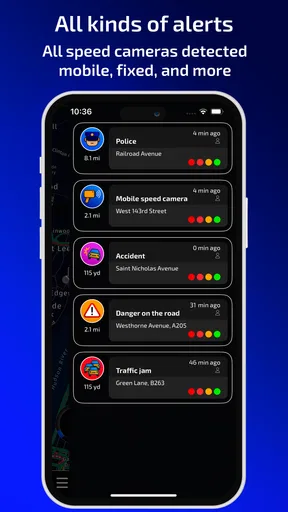
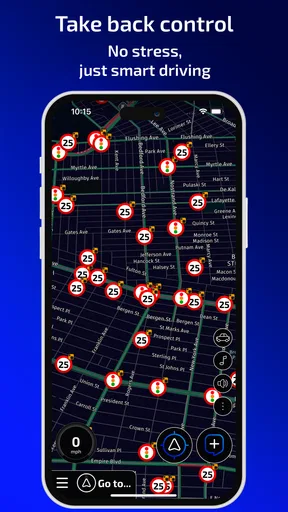
- Real-time Alerts: This is the bread and butter of the app. It provides real-time warnings for speed cameras, red light cameras, and even potential speed traps. It’s like having a co-pilot who’s always on the lookout.
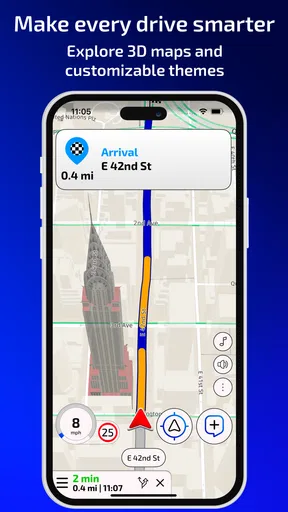
- Speedometer: Keep an eye on your speed without having to glance at your car’s dashboard. Handy and safe!
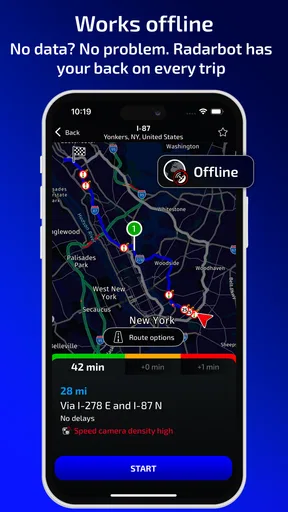
- Offline Mode: No internet? No problem. Radarbot offers an offline mode so you’re never left in the dark.
- Customizable Alerts: You can personalize alerts so you’re not bombarded with unnecessary notifications. Customize it to suit your driving style.
The settings are worth a little attention before your first trip. Alerts that are too frequent can become background noise, while a quieter configuration may make it easier to notice the warnings you care about. I’d begin with only the alert types that matter for my route, then adjust after a few drives. That small bit of setup is more useful than leaving every notification enabled and tuning them out.
Offline use is a helpful distinction from services that depend on an active connection for every part of a trip, but I would prepare before losing coverage rather than assume every map or alert detail will behave identically without internet. Download or refresh what the app makes available while connected, and remember that live or community-sourced information can be less current when a connection is unavailable. Offline mode is best understood as resilience, not a substitute for checking your route in advance.
On the Road Experience
So, how does it perform when you’re out and about? In my experience, the alerts are timely and accurate. I tested it on a regular commute and a road trip, and it consistently gave me a heads-up well before I reached any speed traps or cameras. The voice alerts are clear, and the app doesn’t drain your battery, which is a huge plus.
One thing I noticed is that the app also integrates with music apps, so you won’t miss an alert even if you’re jamming to your favorite tunes. It’s like having your cake and eating it too!
For a comfortable setup, I’d test the volume with music at the level I actually use before leaving, then keep the phone secured and within hearing range. A warning that is technically available but buried under audio is of little practical value. Likewise, the speedometer is a useful reference, but I would not make it a reason to look away from the vehicle’s own instruments or the traffic around me.
There is an important trade-off with any community-informed warning system: reports can be useful, but they are not a promise that every fixed camera, temporary control, or road hazard will appear. A quiet drive does not prove that the route is free of enforcement, and a reported point should not encourage sudden braking. The soundest use is to maintain a legal, steady speed throughout the journey and treat alerts as supporting information.
Community and Updates
Another cool aspect of Radarbot is its community-driven database. Users can report new speed cameras or road hazards, making the app even more reliable. The developers are also pretty active with updates, ensuring that the app stays up-to-date with the latest road info.
Community reports are most helpful when drivers treat them as observations rather than official, complete coverage. They can add practical context on roads that change or on hazards other drivers have noticed, but accuracy may vary by location and by how recently information was reported. I would still follow posted signs and local traffic rules even if the app gives no warning.
This is also where Radarbot differs from a standard map-first navigation tool. Mainstream navigation is often the natural choice when the central problem is finding a destination or comparing routes; Radarbot’s appeal is its emphasis on speed-related alerts. The two approaches can complement one another, but running multiple audio-guidance apps at once may create overlapping prompts. I’d decide which app should handle directions and which should provide supplementary warnings before setting off.
Drivers who prefer one screen and one source of instructions may find that a normal navigation app is enough. Those who want a more focused warning layer may find Radarbot worth keeping alongside their usual route planner. If you mostly drive in one place and already know the roads, the extra app may add little; if your routes vary, its specialized focus is easier to justify.
And if you’re worried about ads or limited features, there’s a premium version. It’s ad-free and comes with some extra goodies like daily updates and more customizable settings. Worth checking out if you’re a frequent driver.
Since paid options span a broad range, I would look at the current in-app purchase details and the particular features offered before spending anything. A frequent driver who values extra customization may see a reason to upgrade, while an occasional user can first judge whether the free version already fits their routine. The key is to pay for a specific benefit you expect to use, not simply because the app presents an upgrade.
When another option is the better fit
Radarbot is not the right choice for every driver. If your main need is public-transport directions, walking routes, destination discovery, or detailed trip planning, a general mapping app is likely to be more useful as your primary tool. If you rarely drive, or if you dislike spoken alerts and prefer a minimal phone setup, adding a dedicated warning app may create more friction than value.
It is also a poor fit for anyone who expects alerts to replace attention, sound judgment, or compliance with local law. Camera-warning rules differ between places, so I would check the rules that apply to the roads I use and avoid relying on an app where this kind of alert is restricted. When a legal or safety question is uncertain, the conservative choice is to follow road signs and use navigation without distracting warning features.
Switching to Radarbot does not necessarily mean abandoning a familiar navigation app. The lower-friction approach is to try it on a short, known journey first, compare how its prompts sit alongside your usual directions, and then decide whether it deserves a place in your regular setup. That trial also shows whether the alert style suits your ears and driving habits before you consider a purchase.
Final Thoughts
All in all, Radarbot: Radar Detector, GPS is a fantastic tool for anyone who spends a lot of time behind the wheel. It’s user-friendly, reliable, and packed with features that make driving a whole lot easier. Whether you’re commuting to work or hitting the open road, this app has got your back.
So, if you’re tired of unexpected tickets or just want a safer driving experience, give Radarbot a try. It might just save you from that dreaded flash of a speed camera. Safe travels, everyone!
My recommendation is to try it as a focused companion, not as a guarantee against tickets or a replacement for attentive driving. It is most appealing if you drive often, change routes, and want camera and hazard alerts alongside the navigation you already trust. If your current map app handles your needs and extra prompts would distract you, there is no need to switch. For everyone else, a brief, carefully configured trial is a sensible way to decide whether Radarbot earns a regular place in the car.
Verdict
Strengths of Radarbot: Radar Detector, GPS
- Accurate real-time traffic alerts
- User-friendly interface
- Customizable alert settings
- Works offline with pre-downloaded maps
- Integrates well with music apps
Limitations of Radarbot: Radar Detector, GPS
- Limited features in free version
- Occasional false positives
- Battery consumption is high
- Ads can be intrusive
- Updates can be slow in some areas
Similar Picks in This Category
View All
Uber - Request a ride
Uber Technologies, Inc.4.7


inDrive. Rides with fair fares
® SUOL INNOVATIONS LTD4.8

Yandex Go: Taxi Food Delivery
Mikromobilnost LLC Belgrade4.8

Bolt: Request a Ride
Bolt Technology4.8

Rapido: Bike-Taxi, Auto & Cabs
Rapido Bike Taxi4.8
You May Also Like
View All


Frequently Asked Questions
What is Radarbot and how does it work?
Radarbot is a real-time radar detector app designed for drivers to avoid speeding tickets. It uses GPS technology to alert users of nearby speed cameras, traffic police, and other road hazards. This app combines traffic alerts with a speedometer, providing a comprehensive driving experience and enhancing road safety.
Is Radarbot legal to use?
The legality of using radar detector apps like Radarbot varies by country and region. In many places, it's legal to use apps that provide information about speed cameras and traffic conditions. However, some jurisdictions may have restrictions, so it's important to check local laws before using the app while driving.
What features does Radarbot offer?
Radarbot offers a wide range of features, including real-time alerts for speed cameras, traffic police, and road hazards. It also provides a speedometer and a HUD mode for safer night driving. Users can customize alerts and receive updates on traffic conditions, enhancing both safety and convenience on the road.
Does Radarbot work offline?
Radarbot can function offline by using downloaded maps and stored information about fixed speed cameras. However, for real-time updates and alerts about mobile speed cameras and traffic conditions, an internet connection is necessary. This ensures you receive the most accurate and up-to-date information while driving.
Are there any subscription fees for Radarbot?
Radarbot offers both free and premium versions. The free version includes basic features, while the premium version offers additional benefits such as ad-free usage, real-time updates, and more detailed alerts. Users can choose the version that best fits their needs and budget, with the option to upgrade at any time.
